using UnityEngine;
using System.Collections;

[RequireComponent(typeof(Rigidbody2D))]
[RequireComponent(typeof(BoxCollider2D))]
public class Player_Controller2D : MonoBehaviour
{
    [Header("Horizontal")]
    public float maxSpeed = 10f;
    public float acceleration = 50f;
    public float deceleration = 50f;
    public float turnSpeed = 80f;

    [Header("Vertical")]
    public float jumpHeight = 4f;
    public float timeToJumpApex = 0.4f;
    public float maxFallSpeed = 20f;

    [Header("Feel")]
    public float fallGravityMult = 1.5f;
    public float jumpCutMult = 0.5f;

    [Header("Coyote Time")]
    public float coyoteTime = 0.2f;
    private float coyoteTimeCounter;

    [Header("Dash")]
    public float dashSpeed = 20f;
    public float dashDuration = 0.2f;
    public float dashCooldown = 0.5f;
    private bool isDashing;
    private float dashTimeLeft;
    private float lastDashTime = -10f;
    private Vector2 dashDir;

    [Header("Ground Detection")]
    public LayerMask groundLayer;
    public float rayLength = 0.1f;
    public float rayInset = 0.05f;
    [SerializeField] private bool isGroundDetected;

    private Rigidbody2D rb;
    private BoxCollider2D boxCol;

    private Vector2 velocity;
    private Vector2 inputVector;

    // 중력 제어 변수
    private float baseGravity;       // 초기 계산된 기준 중력
    private float gravityMultiplier = 1f; // 외부 제어용 배율
    private float jumpForce;
    private int facingDirection = 1;

    // GravityManager 연동용 함수
    public void SetGravityScale(float scale)
    {
        gravityMultiplier = scale;
    }

    void Awake()
    {
        rb = GetComponent<Rigidbody2D>();
        boxCol = GetComponent<BoxCollider2D>();

        rb.bodyType = RigidbodyType2D.Dynamic;
        rb.gravityScale = 0f;
        rb.constraints = RigidbodyConstraints2D.FreezeRotation;
        rb.collisionDetectionMode = CollisionDetectionMode2D.Continuous;

        // 점프 높이 기반 물리 상수 계산
        baseGravity = -(2 * jumpHeight) / Mathf.Pow(timeToJumpApex, 2);
        jumpForce = Mathf.Abs(baseGravity) * timeToJumpApex;
    }

    void Update()
    {
        // 입력 처리
        float inputX = Input.GetAxisRaw("Horizontal");
        float inputY = Input.GetAxisRaw("Vertical");
        inputVector = new Vector2(inputX, inputY);

        if (inputX != 0) facingDirection = (int)Mathf.Sign(inputX);

        // 대쉬 실행
        if (Input.GetButtonDown("Dash") && Time.time >= lastDashTime + dashCooldown)
            StartDash();

        // 코요테 타임 갱신
        if (isGroundDetected) coyoteTimeCounter = coyoteTime;
        else coyoteTimeCounter -= Time.deltaTime;

        // 점프 실행
        if (Input.GetButtonDown("Jump") && coyoteTimeCounter > 0f)
        {
            isDashing = false;
            velocity = rb.linearVelocity;
            velocity.y = jumpForce;
            rb.linearVelocity = velocity;
            coyoteTimeCounter = 0f;
        }

        // 점프 컷 (버튼 뗄 때 감속)
        if (Input.GetButtonUp("Jump") && rb.linearVelocity.y > 0)
        {
            velocity = rb.linearVelocity;
            velocity.y *= jumpCutMult;
            rb.linearVelocity = velocity;
        }
    }

    // 히트 스탑 (임팩트 프레임)
    IEnumerator StopTime(float duration)
    {
        Time.timeScale = 0f;
        yield return new WaitForSecondsRealtime(duration);
        Time.timeScale = 1f;
    }

    void StartDash()
    {
        isDashing = true;
        dashTimeLeft = dashDuration;
        lastDashTime = Time.time;
        StartCoroutine(StopTime(0.07f));

        if (inputVector == Vector2.zero) dashDir = new Vector2(facingDirection, 0);
        else dashDir = inputVector.normalized;
    }

    void FixedUpdate()
    {
        // 1. 대쉬 처리 (물리 연산 오버라이드)
        if (isDashing)
        {
            if (dashTimeLeft > 0)
            {
                rb.linearVelocity = dashDir * dashSpeed;
                dashTimeLeft -= Time.fixedDeltaTime;
                return;
            }
            else
            {
                isDashing = false;
                rb.linearVelocity = dashDir * maxSpeed;
            }
        }

        // 2. 일반 이동 로직
        CheckGroundStatus();
        velocity = rb.linearVelocity;

        // 수평 가감속
        float targetSpeed = inputVector.x * maxSpeed;
        float accelRate;
        if (inputVector.x != 0)
            accelRate = (Mathf.Sign(inputVector.x) != Mathf.Sign(velocity.x) && Mathf.Abs(velocity.x) > 0.1f) ? turnSpeed : acceleration;
        else
            accelRate = deceleration;

        velocity.x = Mathf.MoveTowards(velocity.x, targetSpeed, accelRate * Time.fixedDeltaTime);

        // 최종 중력 계산 (기본값 * 외부 배율)
        float currentGravity = baseGravity * gravityMultiplier;

        // 낙하 가속 (역중력 상황 고려)
        bool isFalling = (currentGravity < 0 && velocity.y < 0) || (currentGravity > 0 && velocity.y > 0);

        if (isFalling)
            currentGravity *= fallGravityMult;

        velocity.y += currentGravity * Time.fixedDeltaTime;

        // 낙하 속도 제한 (역중력 대응)
        if (currentGravity < 0)
             velocity.y = Mathf.Max(velocity.y, -maxFallSpeed);
        else if (currentGravity > 0)
             velocity.y = Mathf.Min(velocity.y, maxFallSpeed);

        rb.linearVelocity = velocity;
    }

    private void CheckGroundStatus()
    {
        Bounds bounds = boxCol.bounds;
        float yOrigin = bounds.min.y + 0.05f;
        float checkDist = 0.05f + rayLength;
        float xLeft = bounds.min.x + rayInset;
        float xRight = bounds.max.x - rayInset;
        float xCenter = bounds.center.x;

        RaycastHit2D hitL = Physics2D.Raycast(new Vector2(xLeft, yOrigin), Vector2.down, checkDist, groundLayer);
        RaycastHit2D hitC = Physics2D.Raycast(new Vector2(xCenter, yOrigin), Vector2.down, checkDist, groundLayer);
        RaycastHit2D hitR = Physics2D.Raycast(new Vector2(xRight, yOrigin), Vector2.down, checkDist, groundLayer);

        isGroundDetected = (hitL.collider != null || hitC.collider != null || hitR.collider != null);
    }

    private void OnDrawGizmos()
    {
        if (boxCol == null) return;

        Bounds bounds = boxCol.bounds;
        float yOrigin = bounds.min.y + 0.05f;
        float checkDist = 0.05f + rayLength;
        float xLeft = bounds.min.x + rayInset;
        float xRight = bounds.max.x - rayInset;
        float xCenter = bounds.center.x;

        Gizmos.color = isGroundDetected ? Color.green : Color.red;
        Gizmos.DrawLine(new Vector2(xLeft, yOrigin), new Vector2(xLeft, yOrigin - checkDist));
        Gizmos.DrawLine(new Vector2(xCenter, yOrigin), new Vector2(xCenter, yOrigin - checkDist));
        Gizmos.DrawLine(new Vector2(xRight, yOrigin), new Vector2(xRight, yOrigin - checkDist));
        Gizmos.DrawRay(transform.position, Vector3.right * facingDirection * 1.5f);
    }
}
셀레스트(Celeste)의 조작감이 완벽한 이유
개발Extremely OK Games Ltd. 유통플랫폼Microsoft Windows[1] | macOS | PlayStation 4 | Xbox One | Xbox Series X|S | Nintendo SwitchXbox Cloud GamingESDSteam | itch.io | 에픽게임즈 스토어 | Microsoft Store(Xbox PC 앱)[2] | PlayStation Store |
songhaboong.tistory.com
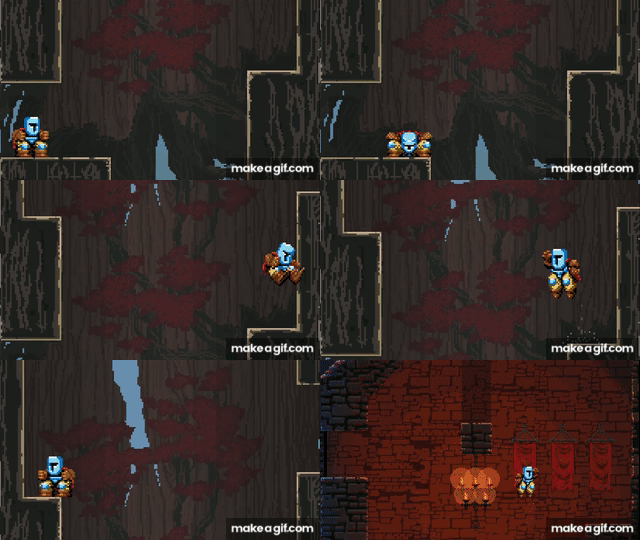
위 게시글을 쓰면서 직접 구현해본 2D Platform Physics.
굳이굳이 유니티 게임엔진의 물리연산방식인 Rigidbody를 사용하지 않는 이유는
섬세한 조작감과 플레이어 친화적인 입력방식을 만들기 위함입니다.
예를 들면 플레이어가 이동을 입력했을 때, 더 빠릿하게 움직였으면 좋겠다던가,
아니면 중력을 점프 시 중력을 상수로 두어 다르게 세팅해야 한다던가,
아무튼... 물리 매커니즘을 만드니 어떤 게임이 되어야만 할지가 떠올랐습니다.
간단하게 말하면 지구에서 끝없이 올라가고, 달까지 도착하는 여정입니다.
올라가다 보면 중력이 줄어들고, 0이되고, 결국 중력은 음수가 되어 달에 착륙하게 되겠죠. <Jump King> 장르라고 할까요..?
using UnityEngine;
using System.Collections.Generic;

public class GravityManager : MonoBehaviour
{
    [System.Serializable]
    public struct GravityStage
    {
        public string stageName;   // 에디터 식별용 이름 (지구, 성층권 등)

        [Range(-2f, 2f)]
        public float gravityScale; // 1: 기본, 0: 무중력, 음수: 역중력
    }

    [Header("Settings")]
    public Player_Controller2D player;
    public List<GravityStage> gravityStages; // 10단계 중력 데이터 리스트

    [Header("Debug")]
    public int currentStageIndex = 0; // 현재 인덱스 확인용

    void Start()
    {
        // 초기 중력값 적용
        ApplyGravity();
    }

    void Update()
    {
        // Page Up: 다음 단계로 변경
        if (Input.GetKeyDown(KeyCode.PageUp))
        {
            if (currentStageIndex < gravityStages.Count - 1)
            {
                currentStageIndex++;
                ApplyGravity();
            }
        }

        // Page Down: 이전 단계로 변경
        if (Input.GetKeyDown(KeyCode.PageDown))
        {
            if (currentStageIndex > 0)
            {
                currentStageIndex--;
                ApplyGravity();
            }
        }
    }

    void ApplyGravity()
    {
        // 예외 처리
        if (player != null && gravityStages.Count > 0)
        {
            float scale = gravityStages[currentStageIndex].gravityScale;

            // 플레이어 스크립트에 배율 전달
            player.SetGravityScale(scale);

            Debug.Log($"중력 변경: {gravityStages[currentStageIndex].stageName} (x{scale})");
        }
    }

    // 테스트용 GUI 표시
    void OnGUI()
    {
        if (gravityStages.Count > 0)
        {
            string status = $"Stage: {currentStageIndex + 1} / {gravityStages.Count}\n" +
                            $"Name: {gravityStages[currentStageIndex].stageName}\n" +
                            $"Scale: {gravityStages[currentStageIndex].gravityScale}";

            // 좌상단 상태창 출력
            GUI.Box(new Rect(10, 10, 200, 60), status);
        }
    }
}
스테이지별 중력을 조절할 수 있는 스크립트.
올라갈수록 중력은 줄어든다.
'🎮 Game Developments > Practices' 카테고리의 다른 글
| Moonscape #1 아이디어 구상 (0) | 2026.02.12 |
|---|---|
| Unity Learn 과정을 진작 할걸 (0) | 2026.01.27 |
| 1BitDragon 유료 작곡 프로그램 (0) | 2026.01.27 |
| 랜덤 큐브 생성기 (Unity Learn) (0) | 2026.01.23 |
| MOQI 기획, 프로토타입 (0) | 2026.01.18 |